Author Archives: Rex

iOS Redeem App Code Mockup

New rule: if I have to google “how to [do something],” your UI needs improvement.

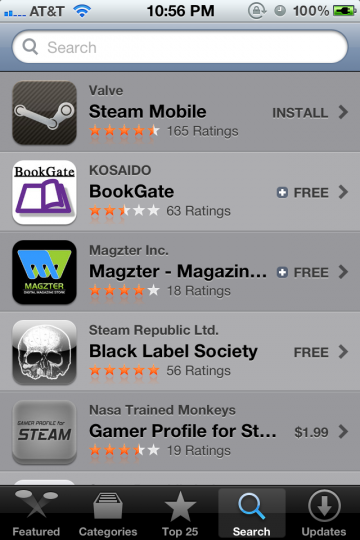
While redeeming an iOS app, I couldn’t figure out where to enter in the app code. I instinctively went to the Search section, as I know that has a text input section at the top:

iPhone App Store Search screen

No dice.

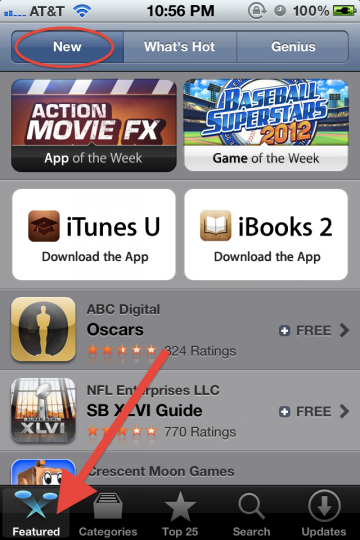
So as with everything in modern life, I went to Google for help. It turns out it’s at the bottom of the Featured screen.

iPhone App Store Featured screen top

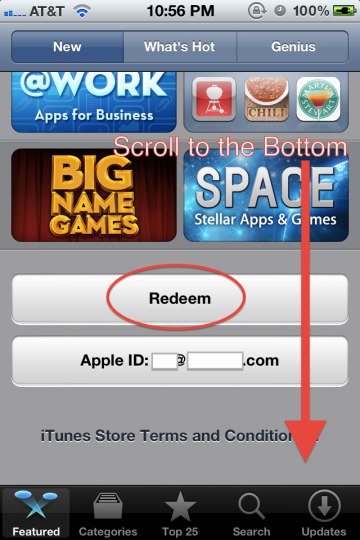
Scrolling down…

iPhone App Store Featured screen bottom

I find the Redeem button, and the rest is cake.

Without googling, I wouldn’t have stumbled upon Featured > New > page bottom to find the Redeem button.

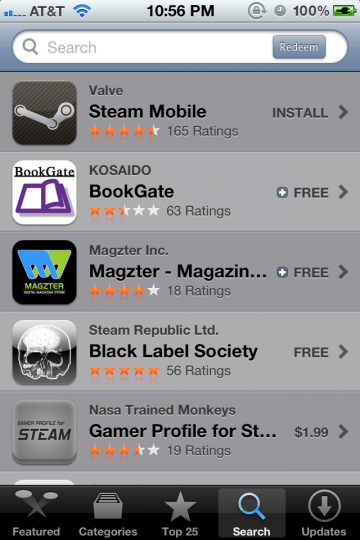
I recognize that for most people, redeeming an app code is not a typical, common use case. That said, it should be somewhere logical. I’ve mocked up the Search screen with a Redeem button:

iPhone App Store Search screen mockup

This way, the user is able to associate entering in names of apps, keywords, or app codes in one convenient field.

The upside is an extremely easy to find Redeem button. A possible downside is that users will get led astray while searching for paid apps (by hunting for app codes instead of proceeding to checkout).

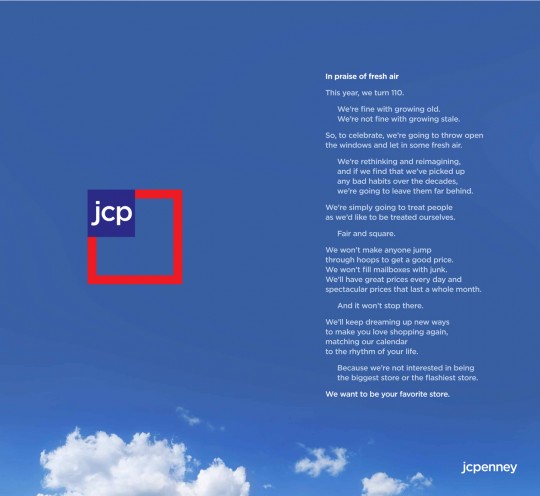
Ron Johnson: We want [jcp] to be your favorite store.

Last year, Ron Johnson left Apple as Senior Vice President of Retail Operations to become J.C. Penney’s (JCP) CEO. Before joining Apple, he was at Target. As Gruber points out today, “The Ron Johnson Era at JC Penney Has Begun.”

jcp Ad by Ken Segall

Johnson took out a two-page ad in several major newspapers with the mission of turning JCP into your favorite store. This is an amazing leadership step that sets the tone and gives an extremely ambitious goal to its employees.

This amazes me because you can see how he’s cutting out the bullshit. With the realization that almost everything sold at JCP is on sale (~72% of the time, discounted over 50%), he’s getting rid of confusing sales. Everything will just be at the sale price without consumers deciphering “SALE 60% off” tags, “Save an Additional 40%” signs, etc. plastered everywhere. Also, he’s implementing about “100 sleek, neat sections” into stores.

As a consumer, I find it extremely hard to imagine a future scenario where JCP is my go-to choice for anything, let alone my favorite store. That doesn’t mean I can’t give Johnson points for trying. If my company was in mass market retail and needed to turn around sales, stealing an A-level player from Steve Job’s pick for retail operations is as good as it gets.

I don’t have any vested interests with JCP performing well or poorly. But given the choice, I’d like to see Johnson turnaround in real-time a company that most people have completely written off as irrelevant (like Apple ten years ago). It would make a good case study.

(via daring fireball)

Steak n Shake NYC Hours

NYC was about 20 degrees Celsius today, which meant short lines for dinner in the city.

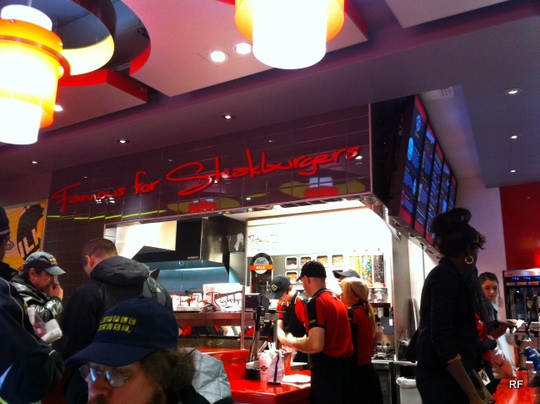
We went to Steak ‘n Shake and it lived up to expectations for a $4 double cheeseburger with fries in NYC.

original double cheeseburger

For such a small restaurant space (typical of NYC dining), the kitchen & wait staff seemed to outnumber the dine-in patrons.

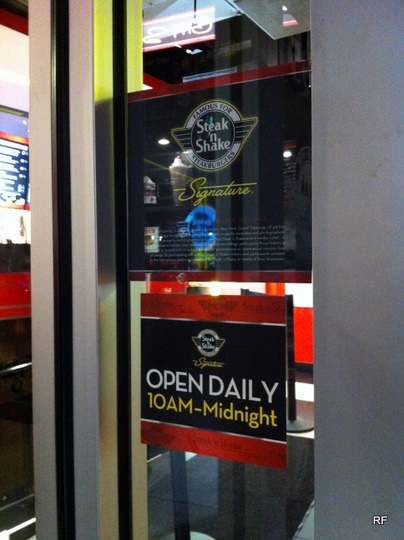
What hours is Steak ‘n Shake NYC open?

The Manhattan Steak ‘n Shake is open from 10 AM to midnight every day.

NYC Steak n Shake hours of operation 10am to midnight

It’s located at 1695 Broadway in Midtown West between 53rd & 54th Streets. This is right next to the David Letterman studio. The phone is (212) 247-6584.

Top NYC Restaurants: Location, Location, and Location

Time Warner Center

Location, as always, matters.

This excellent Grub Street piece explains where NYC’s wealthiest residents (Upper East Siders) eat. It also goes into why top tier Midtown & Downtown restaurants (like Per Se & Momofuku Ko) have to be so culinarily exceptional to earn those set menu dollars.

Bundle looked at spending habits and explains that NYC’s wealthiest spend their money at pricey neighborhood options:

In fact, all of the places whose clientele consists of more than 15 percent luxury spenders are on the Upper East Side, and all are low-key places like Mezzaluna and Bar Italia — not to mention a surprisingly large number of neighborhood sushi spots.

Less affluent diners in Manhattan (from midtown, lower Manhattan, or outer boroughs) avoid uptown and dine at closer top restaurants as an investment:

When diners do spend hundreds of dollars on dinner at a restaurant in the East Village (maybe after waiting in line, since no reservations are accepted), this data shows us it’s likely a significant investment. And the only way a restaurant will keep customers like that coming back is to offer them an exceptional experience with cutting-edge food.

In addition to non-UES residents patronizing top restaurants, NYC has a huge food tourism industry. Top NYC restaurants are destination dining options for those out of state or out of country.

With Sites as Apps, Apps as Sites

From the one and only, Jeffrey Zeldman:

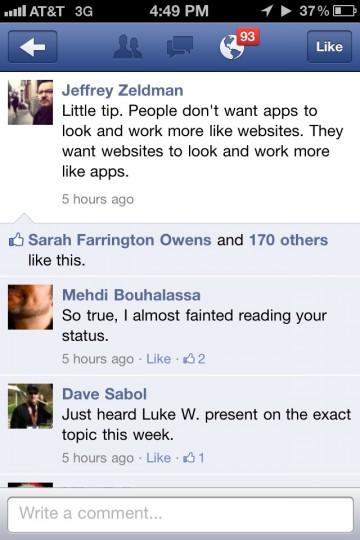
Zeldman Facebook iPhone screenshot

Zeldman says:

Little tip. People don’t want apps to look and work more like websites. They want websites to look and work more like apps.

My gut reaction to this insight is mixed.

On one hand, many new websites are in essence single serving apps. They have no more functionality than extremely niche smartphone apps. On the other hand, websites are visually distinct from apps. What I mean is, sites have been apps for a while now, but they don’t look exactly like smartphone apps. Even with responsive design, sites simply don’t use smartphone title bars and buttons.

Would the average user prefer simple smartphone app UI over tried and true website navigation metaphors? This could be the tradeoff between vertical-scrolling, hierarchical panes VS complex, kitchen sink pages.

Free Online CS Courses Taught by Stanford Faculty Q1 2012

Free Online Courses

I’m currently taking the free Intro to Databases course taught by the excellent Professor Widom. The course consists of video lectures with homework exercises, quizzes and midterms. There is also a helpful Q&A forum for students when you get stuck.

In the beginning of 2012, there are more free online courses available, including:

The classes are high quality and perfect for you if you can spend more than a few hours a week per course. As they are free, the courses don’t offer any official Stanford certificates, grades, or credit. You do get a Statement of Accomplishment from the instructor.

I’d recommend these courses to anyone as they are free, and any investment in your time will be easily rewarded with an understanding in increasingly relevant present-future topics.

Apple Keyboard Shortcuts

We get it. Apple is the company that pays attention to the details. No detail too small, they create their own reality. With a strong internal design culture, they provide customers what they want before they ask for it. But sometimes they misfire (such as their power cords).

I recently started using OS X Lion. Spotlight (command + space) is amazing. Hot corners are cool. The difference between switching applications (command + tab), switching windows (command + `), and switching tabs (control + tab) sucks.

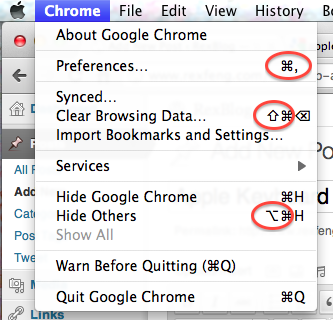
Looking at OS X’s menu bar, how would you ever figure out that that a sloping line with a horizontal line indicates the option key?

Menu Bar example (top to bottom: command, shift, and option)

The command key is clearly labelled on the keyboard. Not sure how you would easily describe the command key symbol’s shape over the phone.

The shift (the up arrow circled above) and the delete key (not circled) can be deduced by your average power user, so I’ll give Apple a pass.

The option symbol, which I’m still not sure how to easily describe (the bottom circled symbol) is a mystery.

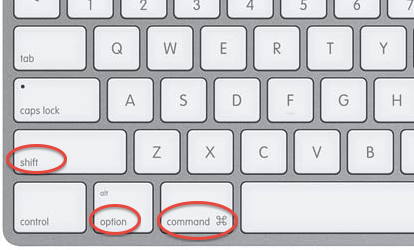
Here is what an Apple keyboard looks like:

Apple Keyboard (from left to right: shift, option, and command)

While Apple is known for their attention to detail, the usage of the option symbol to indicate keyboard shortcuts in the menubar is useless as the option symbol only makes itself evident through 1.) web searching or 2.) consulting an expert Mac user. It doesn’t have to be this way. The easiest solution would be for Apple to print the symbol of the option symbol onto the keyboard.

Jay and Kanye at The Garden

Watch The Throne Tour @ Madison Square Garden

For the Nov. 7th Watch The Throne show at Madison Square Garden, Jay-Z & Kanye performed for a solid two and a half hours. No cameos, no breaks.

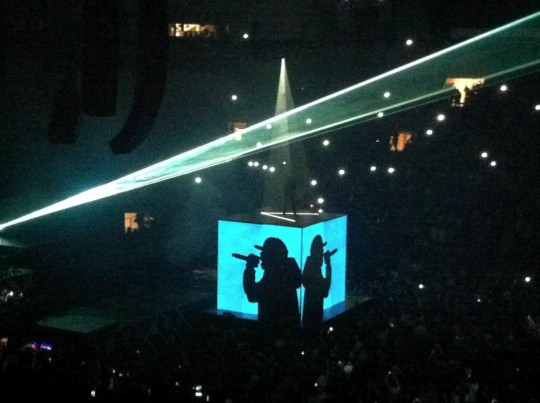
With two rising light cube platforms, the two took turns throwing out bits from WTT and their own albums.

This list of songs performed is not 100% accurate (since I knew all of Kanye’s but not every last one of Jay-Z’s):

H.A.M.
Who Gon Stop Me
Otis
Welcome To The Jungle
Gotta Have It
Big Pimpin'
Can't Tell Me Nothing
Flashing Lights
Through The Wire
Jesus Walks
Diamonds from Sierra Leone
Public Service Announcement
U Don't Know
Run This Town
Monster
Power
Made In America
New Day
Hard Knock Life
Izzo (H.O.V.A.)
Empire State Of Mind
Runaway
Heartless
Stronger
On To The Next One
Dirt Off Your Shoulder
I'm A Hustler Baby
Good Life
Touch The Sky
All Of The Lights
Gold Digger
99 Problems
No Church In The Wild
Lift Off
Niggas in Paris
Niggas in Paris
Niggas in Paris
Encore
Lucifer
Money Ain't A Thang
Can I Get A...
Get Em High
All Falls Down
Why I Love You

The performances were strong and relentless. Most of the full songs performed were from WTT, while their own tracks were cherry picked.

Liked:

  • Jay-Z & Kanye West took down The Garden for a full 2.5 hours, no breaks
  • Kanye’s set included Jesus Walks, Flashing Lights, Through The Wire
  • Great, affordable seats – thank you Citi pre-sale
  • Allowed to bring in phones/cameras/food – security didn’t care

Sucked:

  • 2 hour delay of absolutely nothing between the 7:30p start and the 9:30p actual start
  • The Garden robs you blind – $5 for a bottle of water, sans bottle
  • Illicit drugs in the air, hard to breathe throughout the show
  • No guest appearances – not a game breaker, but the audience expected it

It’s great to be able to cross off watching Jay perform at home from my bucket list.

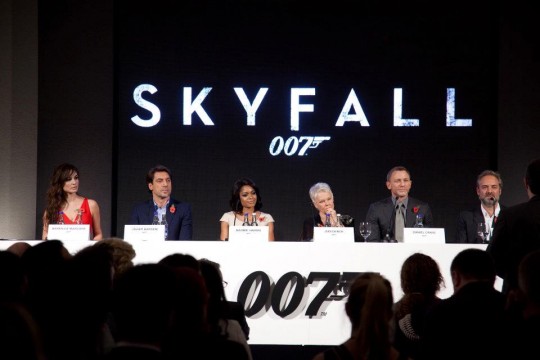
Next Bond Film Title: Skyfall

Hollywood Reporter reveals that the 23rd Bond installment will be titled:

Skyfall

Director Sam Mendes indicated the movie would involve shooting at the following locations:

London, Shanghai, Istanbul, Turkey, and Scotland

As with any Bond film, I’ll be eager to see it in theaters once released. With the 007 franchise, you can love it or hate it, but you know exactly what kind of movie you’re going to get.

(via df)

Former Google Reader PM on the Update

A take on the Google Reader update from former Google Reader Project Manager, Brian Shih:

Google released the previously announced set of changes around G+ integration and UI updates today, and boy is it a disaster.

He continues on visuals:

Taking the UI paradigm for G+ and mashing it onto Reader without any apparent regard for the underlying function is awful and it shows.

His take on Google+ integration:

Ok, before we get started – let me be very clear about one thing. I think integration with G+ should happen. Reader friends should be managed in the same place you manage G+, with the same metaphors (whether you think they’re flawed or not). Sharing should utilize the same infrastructure and plumbing that G+ does. I am not objecting to any of these things. Google has clearly made its bets with G+, and Reader should be part of those plans.

I find his views on the money. Google has every right to integrate Google+, but why do they trash the sharing functionality of Google Reader in the process? I understand that Google is trying to focus, even though it conflicts with their release-everything-as-a-beta-product DNA.

My discontent with the new Reader lies in the sharing workflow. It’s too many steps, as Brian explains:

But the new sharing flow around the +1 button has actually made it harder to share. Where you used to be able to click one button, or hit shift-s to one-click share to your audience, you now need to:

  1. Click +1 (no keyboard shortcuts for you)
  2. Click the text box that appears that says “Share to G+”
  3. Then choose your circle you want to share to (or let it default to public)
  4. Then click Share

Keep in mind that on top of requiring 3-4 times as many clicks, you also now must +1 a post publicly to share it, even if it’s shared to a private circle. That bears repeating. The next time you want to share some sexy halloween costumes with your private set of friends, you first must publicly +1 the post, which means it shows up on your profile, plus wherever the hell G+ decides to use +1 data. So much for building a network around privacy controls.

When Reader updated, I said the same message:

 Google, please separate the steps of explicitly approving content (+1) and sharing content among friends (sharing to Circles). Just place “Share to Circle(s)” between “+1″ and “Email” under each Google Reader content piece.

While I didn’t spell out the new workflow as Brian did, I was talking about the same issue. Why does Reader make you +1 content that you don’t necessarily want to +1 before you are allowed to share? Why does Reader make you take at least 3 steps now compared to 1 step (hitting shift+S) before?
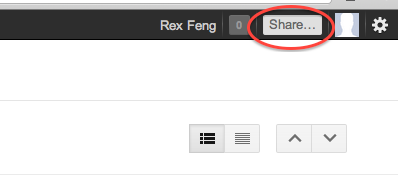
Luckily, there is a non-intuitive solution if you want to share Reader content to Google+ Circles. Brian shares:

If you click on the top right “Share…” field on the OneGoogle bar, you can bypass the +1 button. It’s just completely undiscoverable.

Ultimately, Google has every right to change Reader as it sees fit. Google provides Reader as a free product to users who derive some benefit. Google wants to align its products toward its bottom line, so they made Google+ the de facto sharing system of Reader. That said, users just want to 1.) read news & 2.) share content. It’s a shame that this latest update made #2 a bloated process.

(via googlesystem)